Every document you send includes a complete electronic signature audit trail.
Inkly keeps an audit log of every step: who opened the document, when each person signed, from where, and a fingerprint proving the completed PDF has not changed. All of it lands in a Certificate of Completion you can download or forward.
- Included on Free, Pro, and Teams
- Attached to every completion email
- No signer account required
Completion certificate
Website design agreement
Download PDF- Completed
- Aug 11, 2026 at 11:18:47 AM -07:00
- Signers
- 2
- Recorded events
- 7
Signers
m.vega@northlightdesign.co
Signer 1 · Designer
Marisol Vega
- Signed
- Aug 11, 2026 at 9:46:31 AM -07:00
- Time on document
- 5 minutes
- IP address
- 198.51.100.76
- Approximate location
- Seattle, Washington, United States
- Timezone
- America/Los_Angeles
- Device
- Mozilla/5.0 (Macintosh; Intel Mac OS X 10_15_7) AppleWebKit/537.36 (KHTML, like Gecko) Chrome/141.0.0.0 Safari/537.36
j.ruiz@harborlanepm.com
Signer 2 · Client
Jordan Ruiz
- Signed
- Aug 11, 2026 at 11:18:47 AM -07:00
- Time on document
- 7 minutes
- IP address
- 203.0.113.198
- Approximate location
- Boise, Idaho, United States
- Timezone
- America/Boise
- Device
- Mozilla/5.0 (Macintosh; Intel Mac OS X 10_15_7) AppleWebKit/537.36 (KHTML, like Gecko) Chrome/141.0.0.0 Safari/537.36
Document integrity
- Document ID
- 7f3c1a90-2d64-4a1e-9d0b-5c8e41b6a2f7
- Completed file
- Website-design-agreement-completed.pdf
- Completed PDF · SHA-256
- ca4fd75a5aa5d9b7ee2008a36e1ce008e4c1789cfd5e6cba2cf62d1d10e25f29
What is an electronic signature audit trail?
An electronic signature audit trail is a timestamped record of every action taken on a document, from the moment it is sent to the moment the last person signs. It is the evidence that shows who signed, when, and from where.
A signature image on its own says very little. The audit trail, sometimes called an electronic signature audit log, fills in everything that happened around it: when the document was created and sent, when each recipient opened their private link, when each of them signed, and when the last signature completed the document. For agreements with several parties, Inkly keeps the activity for every signer on the shared document in that same record.
Inkly stores every one of those events with the person who caused it, a precise timestamp, the IP address, an approximate location, the timezone, browser and device details, and a unique event ID. Anything that was not captured is shown as not recorded, so nothing in the log is inferred after the fact.
Recipient Viewed
Aug 11, 2026 at 9:41:03 AM -07:00
m.vega@northlightdesign.co opened the signing link.
- IP address
- 198.51.100.76
- Approximate location
- Seattle, Washington, United States
- Timezone
- America/Los_Angeles
- Event ID
- 2f91d6a4-7b52-48c3-95e1-6a0c7d38b914
- User agent
- Mozilla/5.0 (Macintosh; Intel Mac OS X 10_15_7) AppleWebKit/537.36 (KHTML, like Gecko) Chrome/141.0.0.0 Safari/537.36
Recipient Signed
Aug 11, 2026 at 9:46:31 AM -07:00
m.vega@northlightdesign.co completed their signing step.
- IP address
- 198.51.100.76
- Approximate location
- Seattle, Washington, United States
- Timezone
- America/Los_Angeles
- Event ID
- 3b05e8f2-1d94-4c67-a3b8-52e6c07f9a31
- User agent
- Mozilla/5.0 (Macintosh; Intel Mac OS X 10_15_7) AppleWebKit/537.36 (KHTML, like Gecko) Chrome/141.0.0.0 Safari/537.36
How the record connects a signature to a person.
Attribution and intent come from the whole workflow rather than from the drawn signature alone. Four things do most of that work.
- 01
A private link, sent to one email address
Each recipient is invited by name and email address, with their own signing role and their own link. There is no shared document password and no account to create, and the link belongs to that recipient's step in the workflow.
- 02
Deliberate actions, not a single click
The signer opens the document, completes the fields assigned to them, adopts a signature, and submits. Each of those is a decision the signer makes, which is what documents consent and intent.
- 03
Timestamps for every step
Sent, viewed, and signed times are recorded to the second with a timezone offset, and Inkly records how long each signer spent on the document before submitting it.
- 04
One history for the whole document
Every signer's events sit in a single ordered log, so the sequence of a multi-signer agreement stays readable in one place instead of across separate inboxes.
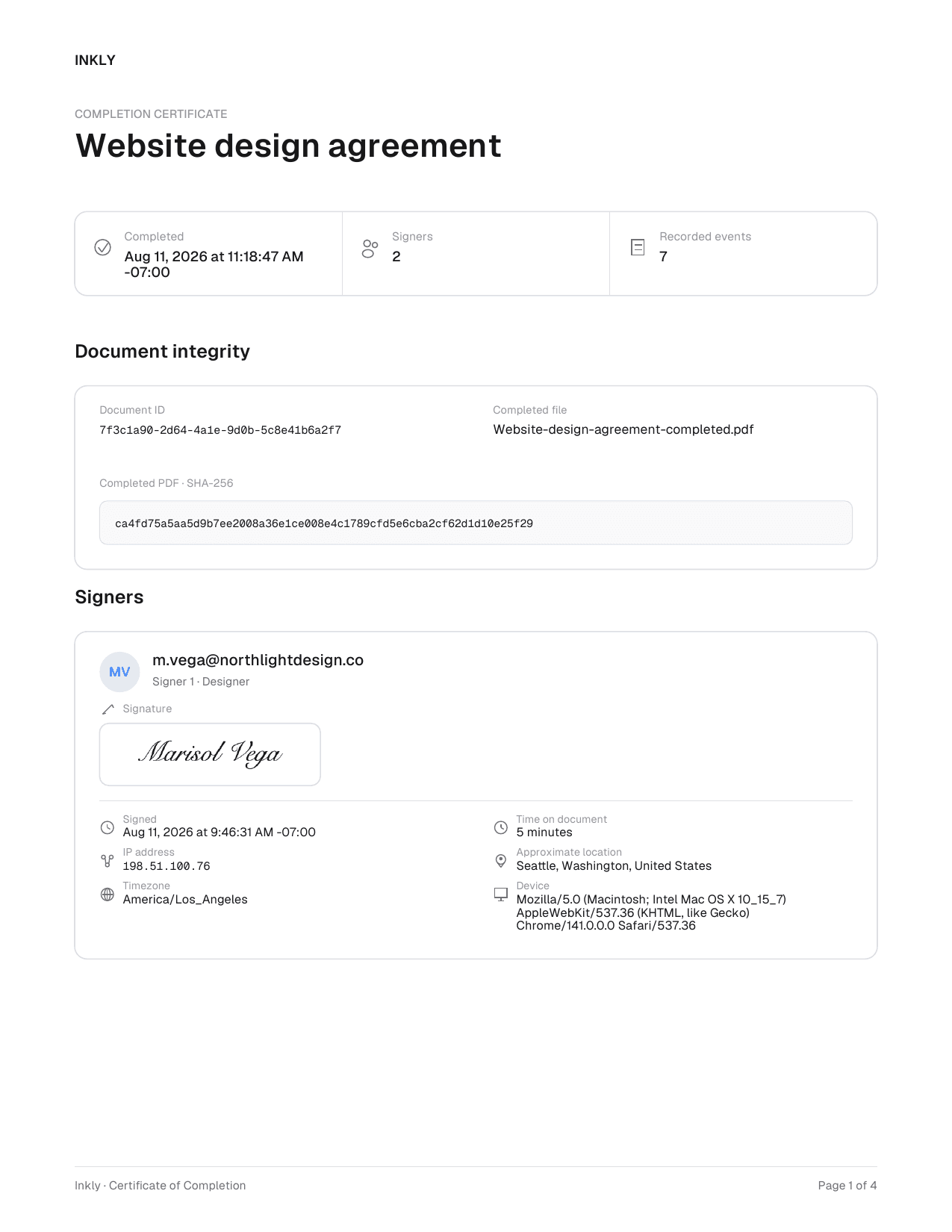
The Certificate of Completion.
A signing history is only useful if you can hand it to someone. When the last required signer finishes, Inkly generates a Certificate of Completion: a PDF carrying the document title, each signer's evidence and captured signature, the full event history, and the fingerprint of the completed file.
When a document is completed, Inkly emails two PDFs to the sender and every signer: the signed document and its Certificate of Completion. Everyone keeps their own copy without an account. The sender can also open or download both in Inkly while the document is available in the workspace. The Certificate of Completion is included on Free, Pro, and Teams.
A fingerprint for the completed PDF.
Inkly calculates a SHA-256 value from the exact bytes of the completed PDF and records it on the certificate. Change one character of that file and the value changes completely, which is what makes the completed document tamper evident.
Anyone holding a copy of the PDF can recompute the value and compare it with the certificate. It is a check on the file itself, not a public lookup service and not a digital certificate issued by a certificate authority.
Completed PDF · SHA-256
ca4fd75a5aa5d9b7ee2008a36e1ce008e4c1789cfd5e6cba2cf62d1d10e25f29Documents signed with Inkly are legally binding.
Inkly is built to comply with the U.S. ESIGN Act and UETA, the federal and state laws that put electronic signatures on equal footing with pen and paper. Under both, a signature or contract cannot be denied legal effect, validity, or enforceability solely because it is electronic.
That is exactly why the record matters. Agreements are rarely questioned on whether electronic signing was allowed. They are questioned on who signed, whether that person meant to, and whether the document changed afterwards. The audit trail, the signer evidence, and the fingerprint answer those three questions, which is what turns a signature into evidence you can rely on.
Questions about signing records.
What gets recorded, who can see it, what it costs, and how far it goes.
Send your first document
in under a minute.
Drag in a PDF, place your fields, and watch the signatures roll in.