Send one document for multiple signatures.
Upload one PDF, give each signer their own fields, and collect legally binding signatures in minutes. Everyone gets their own private link, no account needed.
- One shared PDF
- A private link for each signer
- Up to 25 signers per document

Residential Lease Agreement
DraftRESIDENTIAL LEASE AGREEMENT
3. Rent and Deposits
4. Maintenance and Entry
5. Acceptance
Signatures
LANDLORD'S AGENT
Harborlane Property Management LLC
TENANT
Occupant of record
CO-TENANT
Occupant of record
A seamless signing experience.
Collecting multiple signatures on a PDF online is simple for everyone involved. Each signer gets a private link, opens it without creating an account, and is guided straight to the fields that are theirs to fill in, which means less confusion and fewer mistakes.
Residential Lease Agreement
Tenant
SignedCo-tenant
How a multi-signer document gets sent.
Setting up a multi signer electronic signature request takes a couple of minutes. Upload the PDF, add a party for everyone who needs to sign, and place each person's fields. The same steps work for a two-person NDA or a multi-party agreement with a dozen signers.
Hit send, add an email address for each party, and one send reaches all of them at once. On Pro and Teams you can add a note to the invitation before it goes.
Send document
Each party gets their own private signing link.
Personal note
1875 leftHi all, this is the lease for Unit 3B starting September 1. Sign whenever suits you this week, no need to wait on each other.
Automatic reminders
Schedule reminder emails for unsigned recipients on days 3, 6, and 10.
Save completed document to Google Drive
When everyone signs, save the signed PDF and Certificate of Completion to the "Inkly" folder in your Google Drive.
Live tracking and notifications.
Monitor who has opened the document, who has signed, and who is still pending. Every document has its own status page, and Inkly emails you the moment someone opens it or signs.
Residential Lease Agreement
Recipients
- JSigned
j.ruiz@harborlanepm.com
Signed Aug 18, 2026 at 9:12 AM
- PSigned
priya.raman@ravenmail.com
Signed Aug 18, 2026 at 2:47 PM
- DPending
dana.okafor@ravenmail.com
Third party
Activity
priya.raman@ravenmail.com signed the document
Aug 18, 2026 at 2:47 PM
dana.okafor@ravenmail.com opened the document
Aug 18, 2026 at 11:03 AM
j.ruiz@harborlanepm.com signed the document
Aug 18, 2026 at 9:12 AM
Document sent
Aug 18, 2026 at 8:55 AM
Automatic reminders.
Inkly automatically emails the signers who have not finished yet, so one forgotten inbox does not hold up the whole agreement. Switch it on when you send and Inkly handles the chasing for you.
You can also send a reminder yourself at any time from the document page. Both are on Pro and Teams.
Send document
Each party gets their own private signing link.
Personal note
1875 leftHi all, this is the lease for Unit 3B starting September 1. Sign whenever suits you this week, no need to wait on each other.
Automatic reminders
Schedule reminder emails for unsigned recipients on days 3, 6, and 10.
Save completed document to Google Drive
When everyone signs, save the signed PDF and Certificate of Completion to the "Inkly" folder in your Google Drive.
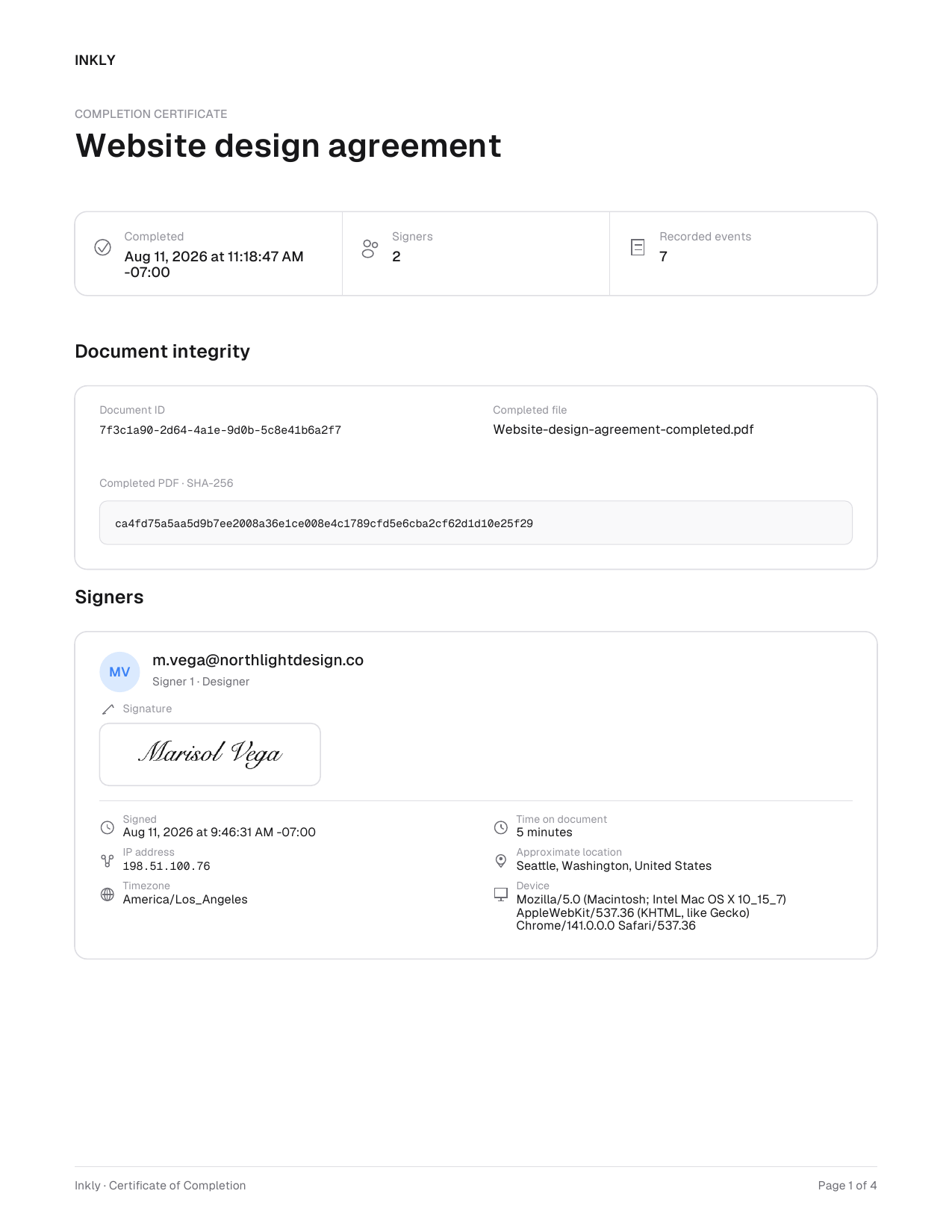
Everyone keeps the signed PDF and the Certificate of Completion.
Inkly completes the document when the last required signature arrives, then emails two PDFs to the sender and to every signer: the completed document, and its Certificate of Completion. Nobody has to ask the sender for a copy afterwards, and nobody needs an account to keep one.
The certificate carries each signer's evidence and the whole document's activity in one place, and it is included on Free, Pro, and Teams. See exactly what gets recorded in the electronic signature audit trail, or upload your PDF to start.
Need a separate copy for each person? Use bulk send.
Multiple signers puts everyone on one document. When each person needs their own, such as an offer letter, a waiver, or a lease renewal, upload a spreadsheet with one row per person and Inkly sends each of them a personalized copy to sign.
Bulk send works from any reusable template and is included on Pro and Teams.
Your spreadsheet
Separate documents
Questions about sending to several signers.
Fields, private links, who signs when, recipient capacity, and what everyone keeps.
Send your first document
in under a minute.
Drag in a PDF, place your fields, and watch the signatures roll in.