The best free e-signature software, compared.
Most free plans stop at 3 to 10 documents a month, and some free offers are really trials. Here's what each one lets you do, and which to choose.
No credit card required
InklyNo monthly cap
- 15
- OpenSign
- 10
- Jotform Sign
- DocuSeal
- 5
- BoldSign
- Documenso
- Zoho Sign
- PandaDoc
- Box Sign
- Xodo Sign
- 3
- Dropbox Sign
- SignWell
- 0
Three things “free” can mean.
Check which one you're getting before you build a process around it.
A free plan
Keeps working as long as you stay within its limits.
- How long it lasts
- As long as you use it
- The trade-off
- Most cap you at 3 to 10 documents a month. Inkly doesn't
- For example
- BoldSign, Documenso, Jotform Sign
A free trial
Runs out and then asks you to pay, and many ask for a credit card up front.
- How long it lasts
- A set number of days
- The trade-off
- You pay to keep using it
- For example
- signNow lists a 7-day trial. Xodo Sign has a trial and a free plan
Free if you host it
The software costs nothing, but you run it.
- How long it lasts
- As long as you run it
- The trade-off
- You handle the server and updates, and each tool sets its own terms
- For example
- DocuSeal, Documenso, OpenSign
The best free tool for each job.
No single free plan wins at everything, so start with the job you need done.
Every free plan, side by side.
Sorted by how much you can send, since that's usually the first limit you hit. Paid prices are the lowest advertised rate, billed annually. Leaving DocuSign? See free DocuSign alternatives.
| Tool and free plan | The catch | Paid from |
|---|---|---|
| InklyUnlimited documentsTemplates and reminders need Pro.Paid from $15/mo | Templates and reminders need Pro. | $15/mo |
| OpenSign15 invitation emails a monthBulk sending, public links, and API signing use credits that only paid plans include.Paid from $9.99/mo | Bulk sending, public links, and API signing use credits that only paid plans include. | $9.99/mo |
| Jotform Sign10 signed documents a monthOne user, with Jotform branding.Paid from $34/mo | One user, with Jotform branding. | $34/mo |
| DocuSeal10 request emails a monthNo API or bulk send on the free hosted plan.Paid from $16.67/user/mo | No API or bulk send on the free hosted plan. | $16.67/user/mo |
| BoldSign5 envelopes a monthRises to 25 a month once your business is verified. One user only.Paid from $5/user/mo | Rises to 25 a month once your business is verified. One user only. | $5/user/mo |
| Documenso5 documents a monthUp to 10 recipients per document, but unlimited use means paying or a self-hosting license.Paid from $25/mo | Up to 10 recipients per document, but unlimited use means paying or a self-hosting license. | $25/mo |
| Zoho Sign5 envelopes a monthOne user, and the cheapest paid plan still caps envelopes.Paid from $10/user/mo | One user, and the cheapest paid plan still caps envelopes. | $10/user/mo |
| PandaDoc5 documents a monthUp to 5 templates and no bulk send.Paid from $19/user/mo | Up to 5 templates and no bulk send. | $19/user/mo |
| Box Sign5 signature requests a monthAn individual plan tied to a Box account.Paid price varies | An individual plan tied to a Box account. | Varies |
| Xodo Sign5 documents a monthNo more than one document every 7 days.Paid from $10/user/mo | No more than one document every 7 days. | $10/user/mo |
| Dropbox Sign3 signature requests a monthTemplates and team features need a paid plan.Paid from $15/mo | Templates and team features need a paid plan. | $15/mo |
| SignWell3 documents a monthOne sender and one template.Paid from $10/mo | One sender and one template. | $10/mo |
| Adobe Acrobat SignSign yourself onlyAsking someone else to sign requires a paid Acrobat plan.Paid from $14.99/mo | Asking someone else to sign requires a paid Acrobat plan. | $14.99/mo |
What you get free on Inkly.
Everything here is on the Free plan, with no credit card and no trial that runs out.
Service agreement
DraftPreviewSend documentSendSERVICE AGREEMENT
Signature *Date *Signature *Date *Send as often as you need
Upload a PDF, place the fields, and send it. There's no monthly limit on what you can send.
SERVICE AGREEMENT
Jordan LeeSignature
Complete
Signers don't need an account
Each signer gets a private link by email and signs from any device, with nothing to install or sign up for.
Document complete
- Contract-completed.pdf
- Contract-completion-certificate.pdf
Download
Everyone gets a copy to keep
When signing finishes, you and every signer are emailed the signed PDF and Certificate of Completion.
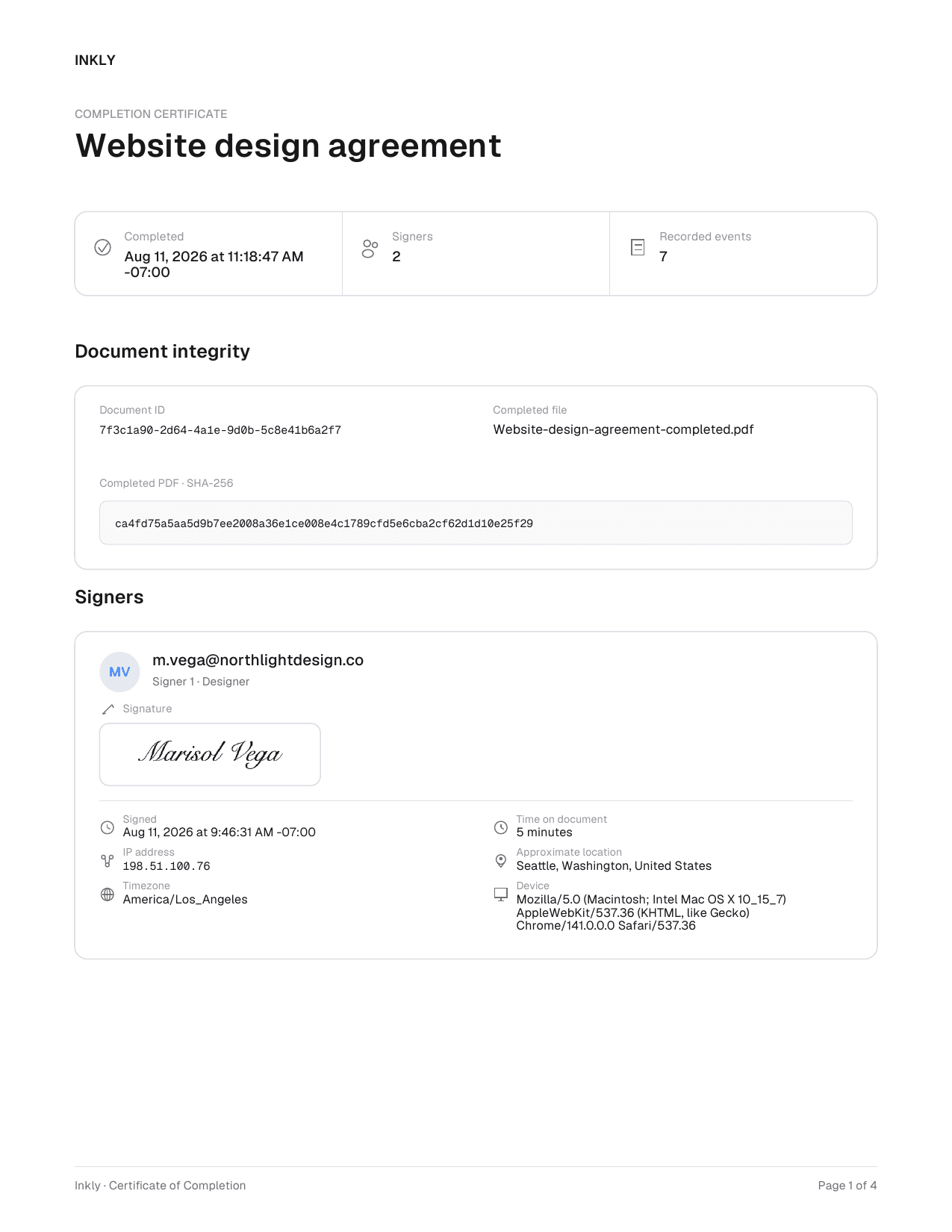
Proof of who signed
Every signed document comes with a tamper-evident certificate showing who signed, when, and from where.
When you outgrow Free.
Inkly's Free plan keeps sending as long as you need it. Pro and Teams add the features that save time once you're sending the same documents again and again.
Free
For individuals
- Not included:
- Not included:
- Not included:
- Not included:
- Not included:
- Not included:
- Not included:
No credit card required
Pro
For professionals and small businesses
Pay $
Questions about free e-signature software.
Limits, legality, and when a free plan stops being enough.
Compare paid plans for small businessesSend your first document
in under a minute.
Drag in a PDF, place your fields, and watch the signatures roll in.